Yield
How to access staking, restaking, and yield opportunities in Aya.
1. Accessing Yield Features
- Open your wallet and navigate to the Yield tab.
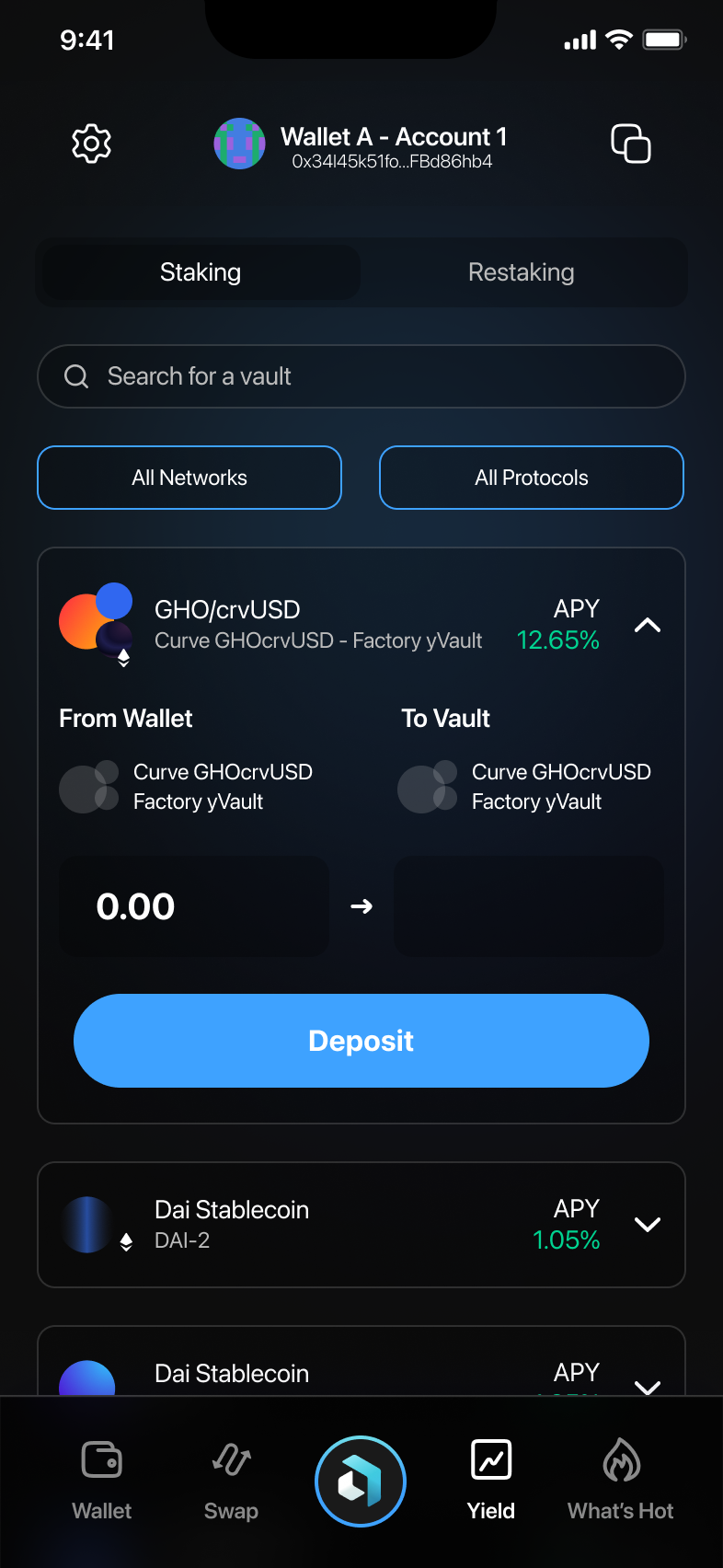
- Here you can see available staking and restaking options.

2. Exploring Yield Opportunities
Viewing Available Vaults
Scroll through to explore different vaults and see their Annual Percentage Yield (APY). Each vault shows potential returns clearly.
Filtering Options
- Tap on All Networks or All Protocols to filter staking opportunities.
- Choose from available networks (e.g., Ethereum, Optimism) or protocols (e.g., Yearn, Aave).
3. Staking Tokens
Choosing a Vault
- Select a vault from the Yield screen by tapping it.
- Input the amount you want to stake in the "From Wallet" section.
Initiating Staking
- After entering the amount, confirm by tapping Deposit.
- A notification will confirm your staking has started.
4. Restaking Tokens
Switching to Restaking
- In the Yield tab, select Restaking.
- Choose your desired restaking pair (e.g., ETH to WeETH).
Initiating Restaking
- Enter the token amount you wish to restake.
- Check the displayed exchange rate, then tap Deposit to confirm restaking.

5. Final Notes and Tips
- Ensure you understand the risks and rewards of staking/restaking.
- Regularly check APYs as they can fluctuate.
- Verify your wallet balance before depositing tokens.
For additional assistance, please use the in-app support resources.